![Adoptech-logo-GreyWithoutStrapline-1.png]](https://knowledge.adoptech.co.uk/hs-fs/hubfs/Adoptech-logo-GreyWithoutStrapline-1.png?height=39&name=Adoptech-logo-GreyWithoutStrapline-1.png)
When someone is away for a long time, for example on long-term sickness or maternity leave, they cannot read policies or finish training. Their requests then go overdue and can make your compliance Tests fail.
Before you start
Do not set the person to Left or Inactive. These statuses are for people who have left the company. They permanently delete the person's read confirmations and policy approvals, and these are not restored if you reactivate them later. Use the steps below instead.
Read requests
A person who is in a group linked to a policy gets a read request for that policy. If they cannot read it, the request becomes overdue and the Policy read Test fails. To avoid this, move the person to a separate group while they are away.
When the person goes on leave
- Go to People and create a group called Long term absence (once only). Do not link any policies to this group.
- Open the person's profile, find the Groups panel and click Edit.
- Tick Long term absence and untick all their other groups. Then save.
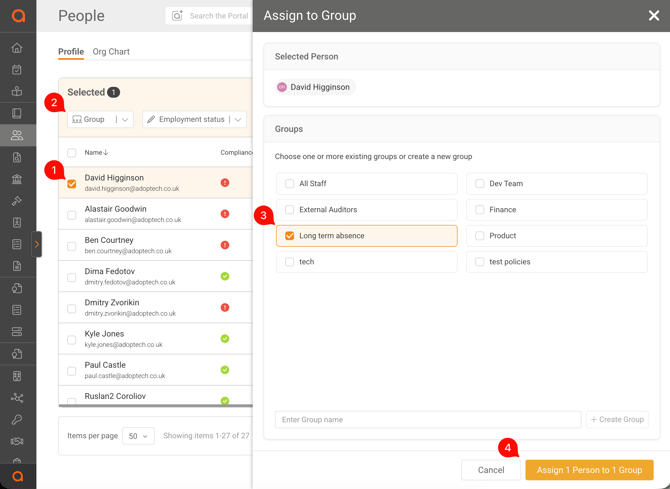
Their open read requests are removed. They will not get new ones while they are in the Long term absence group.
To move several people at once, select them on the People page and use Assign to Group and Remove from Group.
When the person comes back
- Open the person's profile and click Edit in the Groups panel.
- Add their original groups again and untick Long term absence.
They get new read requests for the policies linked to their groups. The due date starts from the day you add them back, so they have the normal time to read each policy.
Tip: write down the person's groups before you move them, for example in your own HR notes, so you can restore them exactly.
Security awareness training
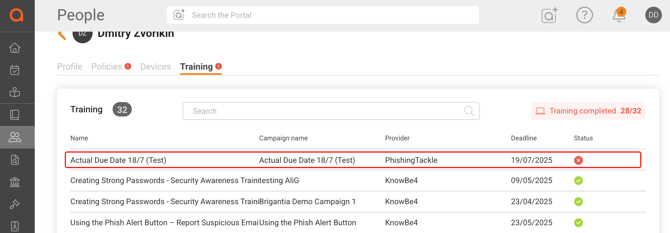
Training courses and phishing campaigns are sent by your training provider (Phishing Tackle, KnowBe4 or Huntress), not by Adoptech. Adoptech reads each person's courses from the provider every night. A person on long-term absence still has an active account, so a course that passes its due date counts as overdue and can make your training Test fail.
The Long term absence group in Adoptech only pauses policy read requests. It does not pause training. Do it in your training provider instead.
Phishing Tackle
- When the person goes on leave, add the OOO tag to them in Phishing Tackle.
- Make sure every campaign excludes people with the OOO tag. Please refer to the help article below for the steps:
https://support.phishingtackle.com/hc/en-gb/sections/360004603452-Tag-Management - When the person is back, remove the OOO tag. They are included in the next campaign.
The tag keeps the person out of new campaigns. A course that was already sent stays open. If the person already has an open or overdue course, also remove them from that campaign in Phishing Tackle. The open course then disappears from Adoptech at the next nightly sync. Courses the person already completed are kept.
KnowBe4 and Huntress
Pause or remove the person's course or campaign in the provider while they are away, and add them back when they return. The open course disappears from Adoptech at the next nightly sync, and completed courses are kept.
What not to do
- Do not set the person to Left. This deletes their read confirmations and approvals and stops all notifications to them.
- Do not deactivate or delete the account. This also deletes their read confirmations and approvals, and reactivating does not bring them back.
- Do not leave them in their normal groups. Their read requests will go overdue and the Policy read Test will fail.
Related articles
- How do I manage user groups?
- How do I create Groups? and how should I group people?
- How can I check who has read a policy?
- How do I set up my Phishing Tackle Integration?
Need Help? Contact support@adoptech.co.uk or open a chat.