![Adoptech-logo-GreyWithoutStrapline-1.png]](https://knowledge.adoptech.co.uk/hs-fs/hubfs/Adoptech-logo-GreyWithoutStrapline-1.png?height=39&name=Adoptech-logo-GreyWithoutStrapline-1.png)
If you decided that a certain control doesn't fit your company's compliance posture, you can easily exclude it from the framework you're doing.
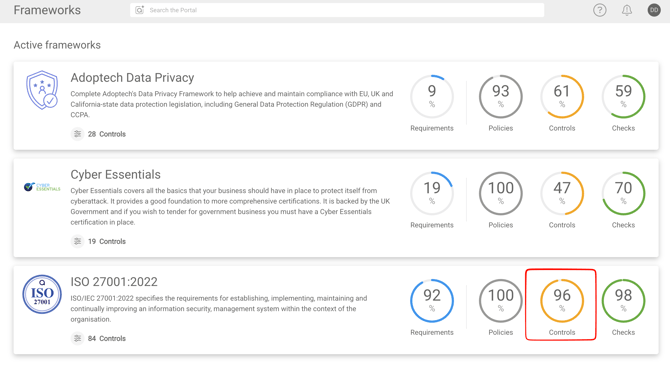
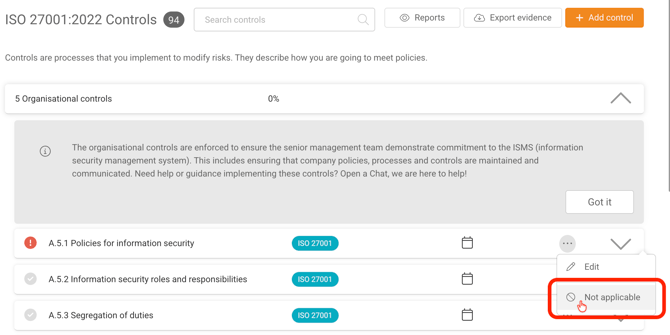
In the example below we'd like to mark a control A.5.1 as Non applicable in our ISO 27001 framework.
On the frameworks page, click on the Controls dial (shown on the image below).
Find the control you'd like to exclude, click three dots and select Not applicable as shown below.
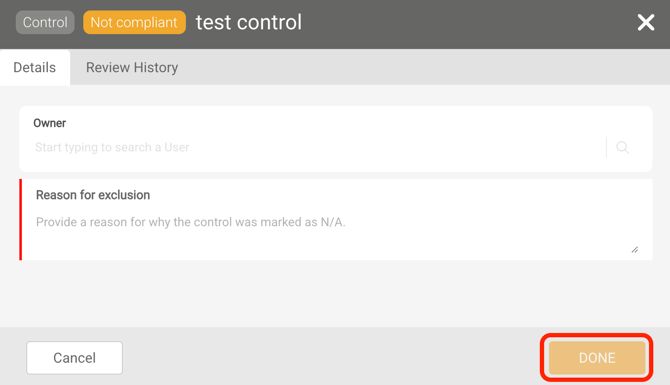
Provide a reason for exclusion and click Done.
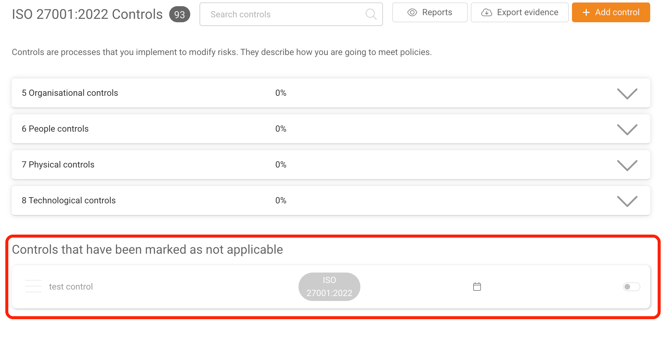
You can find the controls marked as not applicable on the same page at the bottom.