Skip to content
  • There are no suggestions because the search field is empty.

How do I connect Aikido to Adoptech?

How does the Aikido integration work in Adoptech?

Overview

The Aikido integration pulls vulnerability scan results directly from Aikido Security into Adoptech. Once connected, Adoptech uses your Aikido data to automatically verify compliance with a broad range of ISO 27001 technical controls covering vulnerability management, secure coding, network security, cryptography, logging, and malware protection — without any manual evidence uploads.

Before you begin

You will need:

  • - An active Aikido Security account with at least one repository connected

  • - Owner or Security Manager role in Adoptech

  • - An Aikido Client ID and Client Secret — generated in the Aikido dashboard under Integrations → Public REST API
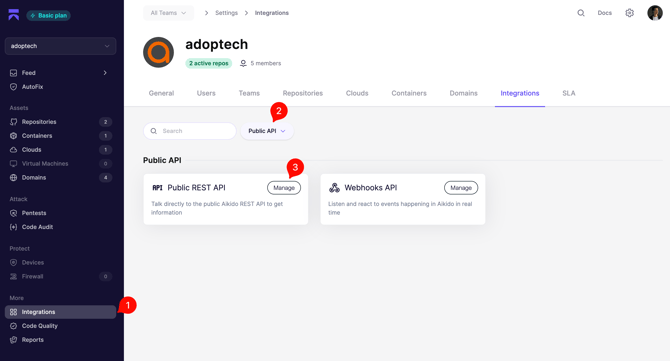
Note: the following permissions are required: repositories:read + reports:read
Connecting the integration

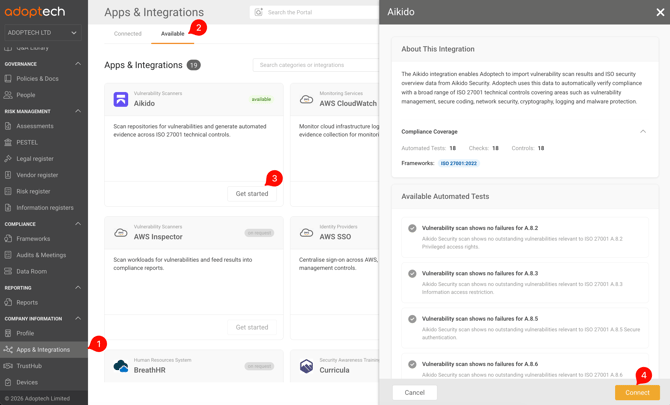
1. In Adoptech, navigate to Company Information → Apps & Integrations. Locate the Aikido card under the Vulnerability Scanners category and click Get Started.

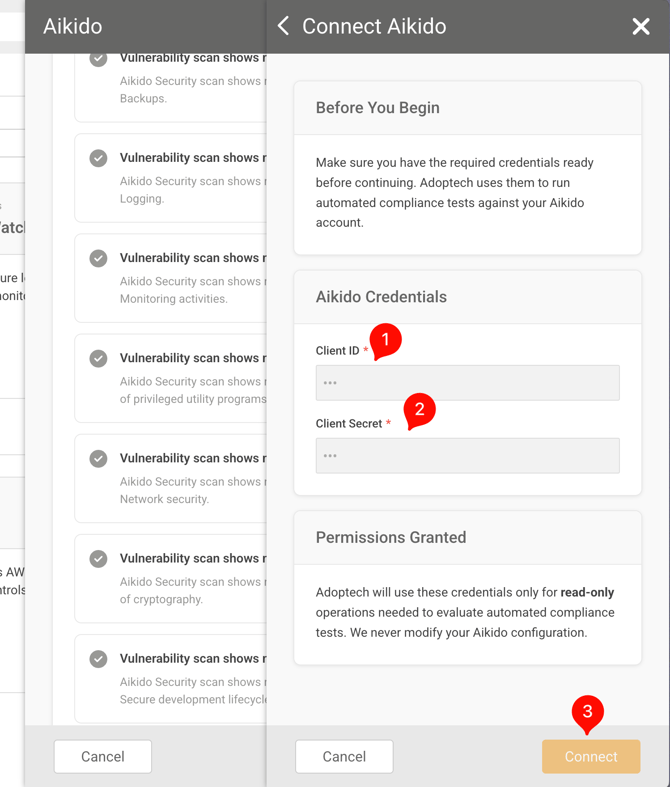
2. In the drawer that opens, enter your Client ID and Client Secret. Click Connect. Adoptech will exchange these credentials for an access token and run an initial connection check.

If the connection succeeds, the card status changes to Connected and Adoptech begins syncing your Aikido data.

What data is synced

Adoptech pulls two data sets from Aikido:

1. Data set: Repository vulnerability findings

Aikido endpoint: /repositories/code

Used for: Verifying secure coding and dependency management controls

2. Data set: ISO 27001 security overview

Aikido endpoint: /report/iso/overview

Used for: Mapping findings to specific ISO 27001 clauses (A.8.x series)

Adoptech maps each entry in Aikido's ISO overview to the corresponding control in your framework. A control is marked compliant when all of Aikido's checks for that clause are in a complying or disabled state. Any other status causes the control to show as failing, with detail on which checks did not pass.

Controls covered

The Aikido integration provides automated evidence for ISO 27001 controls including (but not limited to):

- A.8.2 — Privileged access rights

- A.8.7 — Protection against malware

- A.8.8 — Management of technical vulnerabilities

- A.8.9 — Configuration management

- A.8.20 — Network security

- A.8.24 — Use of cryptography

- A.8.25 — Secure development lifecycle

- A.8.29 — Security testing in development and acceptance

The exact list of covered controls depends on what Aikido has scanned in your environment.

Interpreting results

After syncing, navigate to your ISO 27001 framework in Adoptech and open any control in the A.8 series. Checks sourced from Aikido are labelled with the Aikido source. Each check shows one of the following statuses:

Passing — All Aikido checks for that ISO clause are complying or disabled.

Failing — One or more checks are in a non-compliant state. The failing check titles are listed for remediation.

No data — Aikido has not yet scanned that area, or no checks are defined for that clause.

Disconnecting

To remove the integration, go to Settings → Integrations, click the Aikido card, and select Disconnect. Adoptech will stop syncing data and existing automated evidence will no longer be refreshed.

Troubleshooting

The integration shows "Error" after saving credentials

Verify that the Client ID and Client Secret were copied without leading or trailing spaces. Regenerate them in Aikido if needed, then reconnect.

Controls are failing even though Aikido shows no issues

Aikido may not have scanned the relevant area yet. Check your Aikido dashboard to confirm that the ISO overview report includes entries for the affected clauses.

The integration is connected but no checks are updating

Adoptech refreshes Aikido data on a scheduled basis. If checks remain stale, disconnect and reconnect to force a fresh sync.

Need Help? Contact support@adoptech.co.uk or open a chat.