![Adoptech-logo-GreyWithoutStrapline-1.png]](https://knowledge.adoptech.co.uk/hs-fs/hubfs/Adoptech-logo-GreyWithoutStrapline-1.png?height=39&name=Adoptech-logo-GreyWithoutStrapline-1.png)
On the Live tab of the Policies & Docs page there is a Read by # column. It shows how many people have read the policy out of how many were asked, for example 1/6.
- The number turns red, with a clock, when a read deadline has passed.
- Not Set Up means no read request has been sent for this policy.
- Not Required means the read request was skipped for this policy.
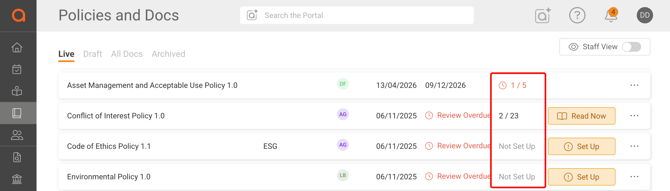
Select the number to open Read Requests. The list shows each person, their deadline and their status:
- Deadline Passed - the person has not read the policy and the deadline has passed.
- Not Yet Read - the person has not read the policy, and the deadline has not passed.
- Read - the person has confirmed they read the policy.
The most urgent people are at the top. You can search by name or email, filter by status, and sort by People, Deadline or Status.
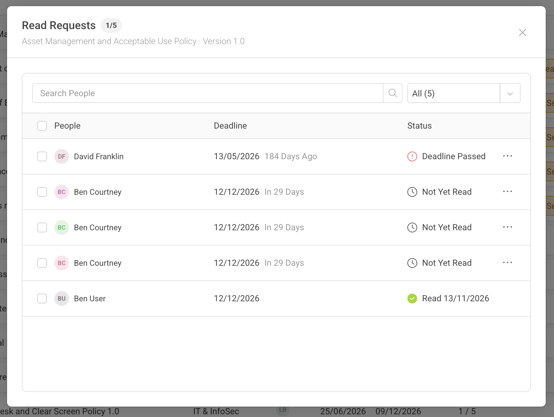
The same list is under Read Requests in Policy Settings. From this list you can also send reminders. See How do I share policies with the team?
Need Help? Contact support@adoptech.co.uk or open a chat.